> ## Documentation Index
> Fetch the complete documentation index at: https://docs.edgeimpulse.com/llms.txt
> Use this file to discover all available pages before exploring further.
# Search space
> Constrain EON Tuner searches with templates that define input, processing, and learning block combinations.
For many projects, you will need to constrain the EON Tuner to use steps that are defined by your hardware, your customers, or your expertise.
For example:
* Your project requires to use a grayscale camera because you already purchased the hardware.
* Your engineers have already spent hours working on a dedicated digital signal processing method that has been proven to work with your sensor data.
* You have the feeling that a particular neural network architecture will be more suited for your project.
This is why we developed an extension of the EON Tuner: the **EON Tuner Search Space**.
Please read first the [EON Tuner](/studio/projects/eon-tuner) documentation to configure your **Target**, **Task category** and desired **Time per inference**.
### Understanding Search Space Configuration
The EON Tuner Search Space allows you to define the structure and constraints of your machine learning projects through the use of templates.
#### Templates
The **Search Space** works with templates. The templates can be considered as a config file where you define your constraints. Although templates may seem hard to use in the first place, once you understand the core concept, this tool is highly capable.
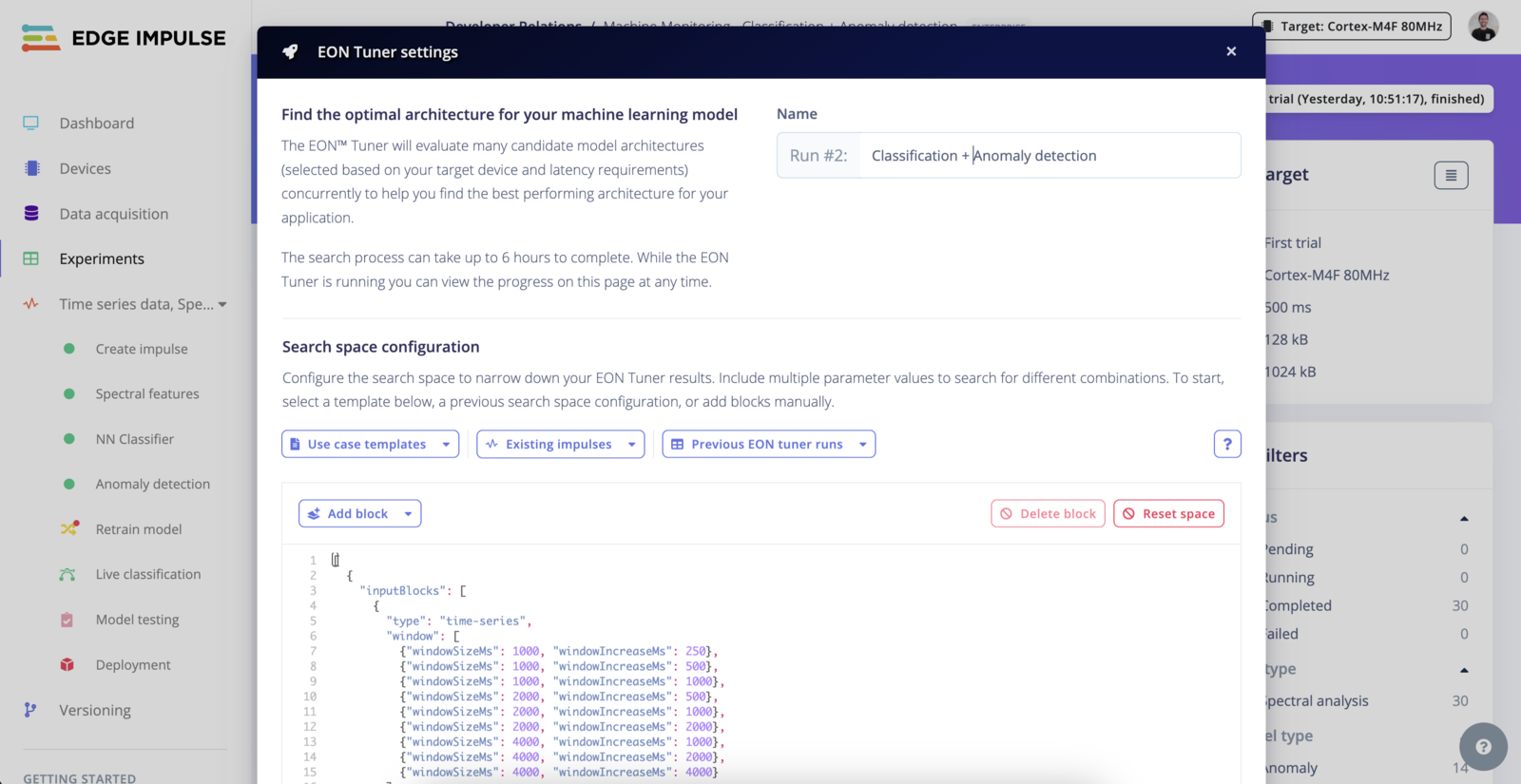 A blank template looks like the following:
```
[
{
"inputBlocks": [],
"dspBlocks": [],
"learnBlocks": []
}
]
```
#### Load a template
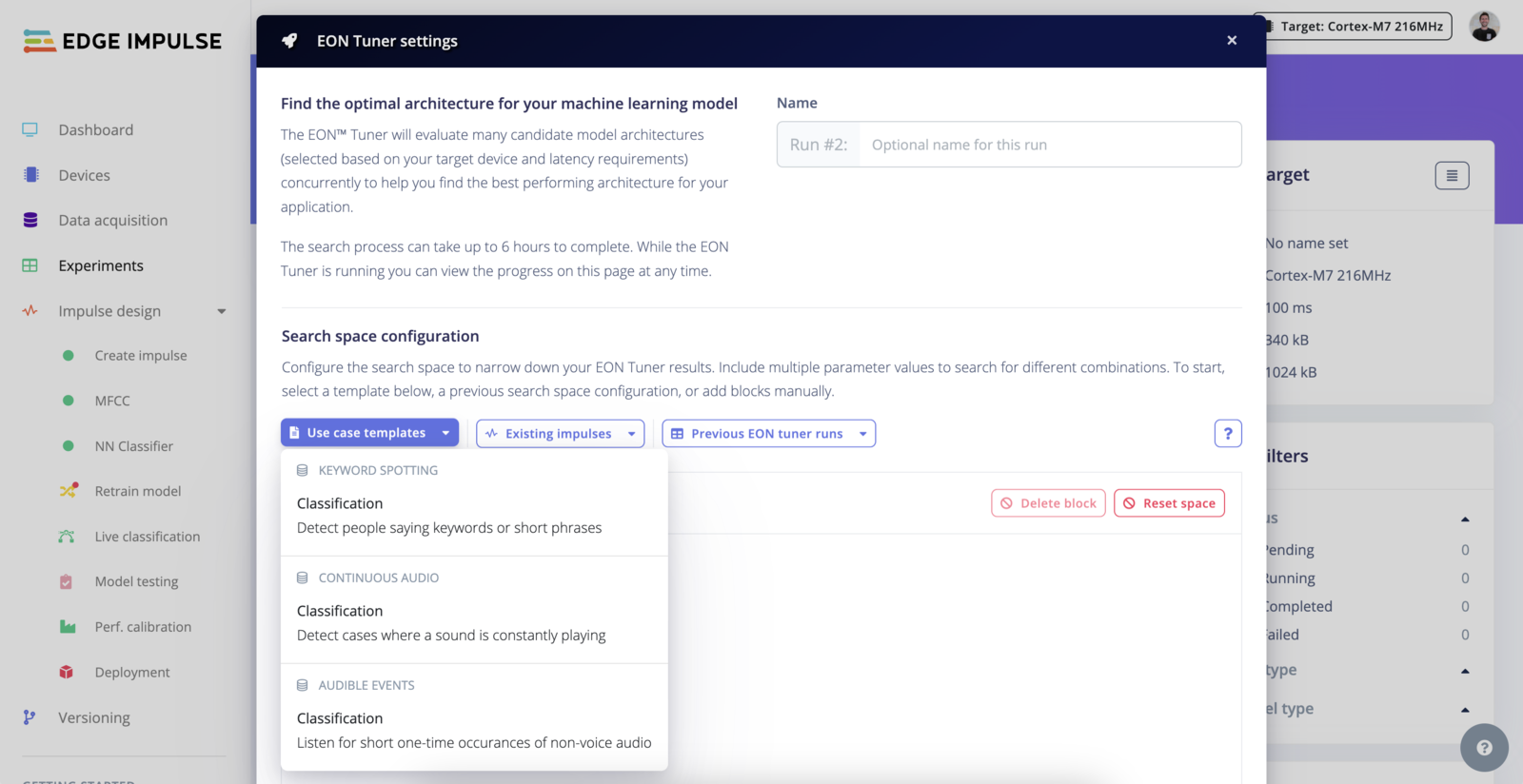
To understand the core concepts, we recommend having a look at the available templates. We provide templates for different task categories as well as one for your current impulse if it has already been trained.
A blank template looks like the following:
```
[
{
"inputBlocks": [],
"dspBlocks": [],
"learnBlocks": []
}
]
```
#### Load a template
To understand the core concepts, we recommend having a look at the available templates. We provide templates for different task categories as well as one for your current impulse if it has already been trained.
 #### Search parameters
Elements inside an array are considered as parameters. This means, you can stack several combinations of `inputBlocks|dspBlocks|learnBlocks` in your templates and each `block` can contain several elements:
```
[
{
"inputBlocks": [],
"dspBlocks": [],
"learnBlocks": []
},
{
"inputBlocks": [],
"dspBlocks": [],
"learnBlocks": []
},
...
]
```
or
```
...
"inputBlocks": [
{
"type": "time-series",
"window": [
{"windowSizeMs": 300, "windowIncreaseMs": 67},
{"windowSizeMs": 500, "windowIncreaseMs": 100}
]
],
...
```
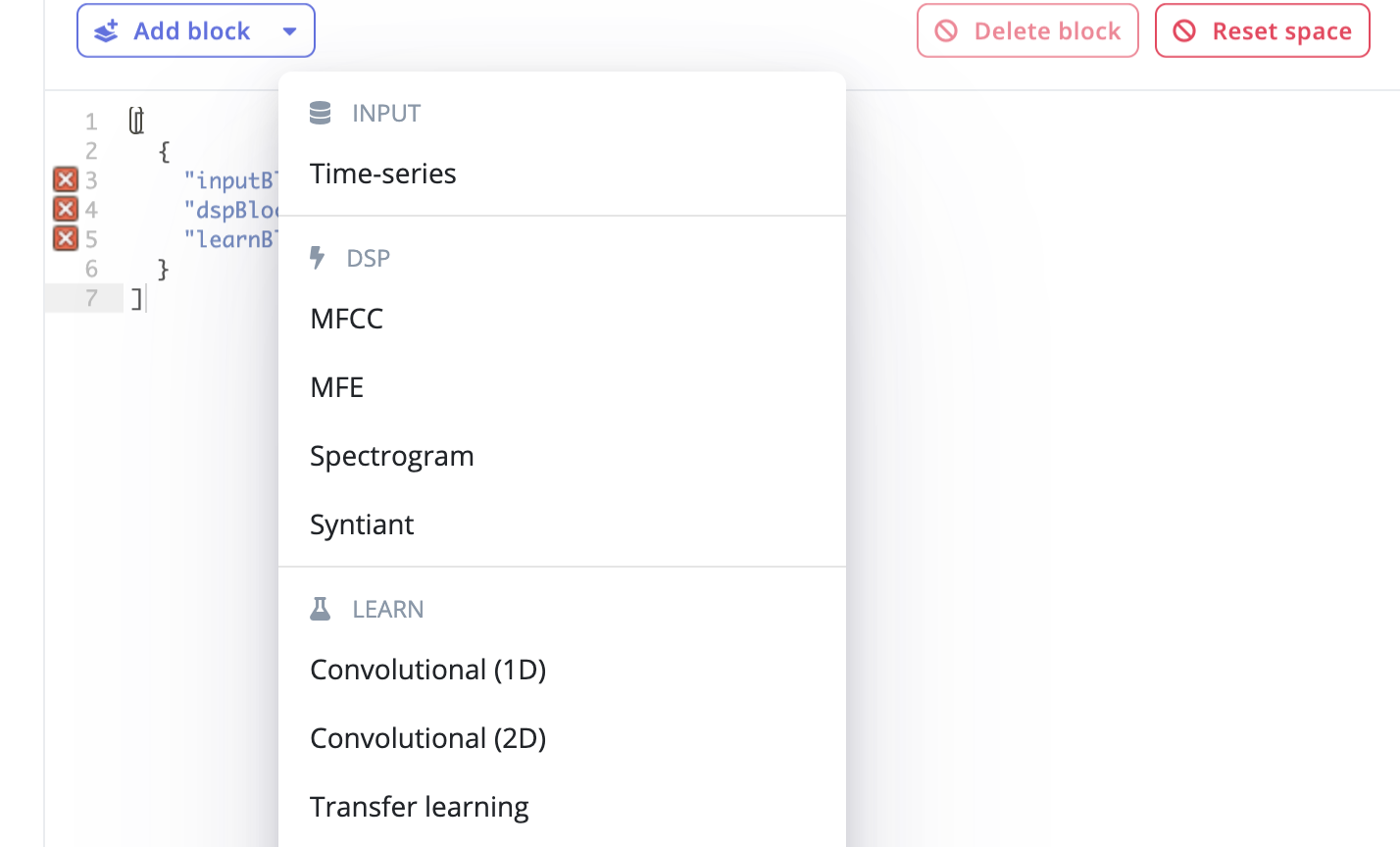
You can easily add pre-defined blocks using the **+ Add block** section.
#### Search parameters
Elements inside an array are considered as parameters. This means, you can stack several combinations of `inputBlocks|dspBlocks|learnBlocks` in your templates and each `block` can contain several elements:
```
[
{
"inputBlocks": [],
"dspBlocks": [],
"learnBlocks": []
},
{
"inputBlocks": [],
"dspBlocks": [],
"learnBlocks": []
},
...
]
```
or
```
...
"inputBlocks": [
{
"type": "time-series",
"window": [
{"windowSizeMs": 300, "windowIncreaseMs": 67},
{"windowSizeMs": 500, "windowIncreaseMs": 100}
]
],
...
```
You can easily add pre-defined blocks using the **+ Add block** section.
 #### Format
#### Input Blocks (`inputBlocks`)
#### Common Fields for All Input Blocks
* **`id`**: Unique identifier for the block.
* **Type**: `number`
* **`type`**: The nature of the input data.
* **Type**: `string`
* **Valid Options**: `time-series`, `image`
* **`title`**: Optional descriptive title for the block.
* **Type**: `string`
#### Specific Fields for Image Type Input Blocks
* **`dimension`**: Dimensions of the images.
* **Type**: `array` of `array` of `number`
* **Example Valid Values**: \[\[32, 32], \[64, 64], \[96, 96], \[128, 128], \[160, 160], \[224, 224], \[320, 320]]
* **Enterprise Option**: All dimensions available with full enterprise search space.
* **`resizeMode`**: How the image should be resized to fit the specified dimensions.
* **Type**: `array` of `string`
* **Valid Options**: `squash`, `fit-short`, `fit-long`
* **`resizeMethod`**: Method used for resizing the image.
* **Type**: `array` of `string`
* **Valid Options**: `nearest`, `lanczos3`
* **`cropAnchor`**: Position on the image where cropping is anchored.
* **Type**: `array` of `string`
* **Valid Options**: `top-left`, `top-center`, `top-right`, `middle-left`, `middle-center`, `middle-right`, `bottom-left`, `bottom-center`, `bottom-right`
#### Specific Fields for Time-Series Type Input Blocks
* **`window`**: Details about the windowing approach for time-series data.
* **Type**: `array` of `object` with fields:
* **`windowSizeMs`**: The size of the window in milliseconds.
* **Type**: `number`
* **`windowIncreaseMs`**: The step size to increase the window in milliseconds.
* **Type**: `number`
* **`windowSizeMs`**: Size of the window in milliseconds if not specified in the `window` field.
* **Type**: `array` of `number`
* **`windowIncreasePct`**: Percentage to increase the window size each step.
* **Type**: `array` of `number`
* **`frequencyHz`**: Sampling frequency in Hertz.
* **Type**: `array` of `number`
* **`padZeros`**: Whether to pad the time-series data with zeros.
* **Type**: `array` of `boolean`
#### DSP Blocks (`dspBlocks`)
#### Common Fields for All DSP Blocks
* **`id`**: Unique identifier for the DSP block.
* **Type**: `number`
* **`type`**: The type of Digital Signal Processing to apply.
* **Type**: `string`
* **Valid Options**: `raw`, `spectral-analysis`, `mfe`, `mfcc`, `spectrogram`, `image`, `flatten`, `organization` (the last one available only if full enterprise search space is enabled)
* **`axes`**: Name of the data axes in the project.
* **Type**: `array` of `string`
* **`implementationVersion`**: Version of the DSP method used.
* **Type**: `number`
* **`title`**: Optional title for the DSP block.
* **Type**: `string`
#### Conditional Fields Based on DSP Type
**For `image` Type**
* **`channels`**: Color channels used in the image.
* **Type**: `array` of `string`
* **Valid Options**: `RGB`, `Grayscale`
**For `spectral-analysis` Type**
* **`fft-length`**: Length of the Fast Fourier Transform applied.
* **Type**: `array` of `number`
* **Enterprise-specific Valid Options**: \[16, 64]
* **`scale-axes`**: Scale factor for the axes.
* **Type**: `array` of `number`
* **Enterprise-specific Valid Options**: \[1]
* **`filter-type`**: Type of filter applied.
* **Type**: `array` of `string`
* **Valid Options**: `low`, `high`, `none`
* **`filter-cutoff`**: Cutoff frequency for the filter.
* **Type**: `array` of `number`
* **`filter-order`**: Order of the filter.
* **Type**: `array` of `number`
* **`do-log`**: Whether to apply logarithmic scaling.
* **Type**: `array` of `boolean`
* **`do-fft-overlap`**: Whether to overlap FFT windows.
* **Type**: `array` of `boolean`
* **`spectral-peaks-count`**: Number of spectral peaks to identify.
* **Type**: `array` of `number`
* **`spectral-peaks-threshold`**: Threshold for identifying spectral peaks.
* **Type**: `array` of `number`
* **`spectral-power-edges`**: Defines the spectral edges for power calculation.
* **Type**: `array` of `string`
* **`autotune`**: Whether to enable automatic tuning of parameters.
* **Type**: `array` of `boolean`
* **`analysis-type`**: Type of spectral analysis.
* **Type**: `array` of `string`
* **Valid Options**: `FFT`, `Wavelet`
* **`wavelet-level`**: Level of wavelet transformation.
* **Type**: `array` of `number`
* **`wavelet`**: Type of wavelet used.
* **Type**: `array` of `string`
* **`extra-low-freq`**: Whether to include extra low frequencies in analysis.
* **Type**: `array` of `boolean`
* **`input-decimation-ratio`**: Ratio for input decimation.
* **Type**: `array`
**For `mfcc`, `mfe` Types**
* **`num_filters`**: Number of filters used in MFCC or MFE.
* **Type**: `array` of `number`
* **`num_cepstral`**: Number of cepstral coefficients in MFCC.
* **Type**: `array` of `number`
* **`win_size`**: Window size for the analysis.
* **Type**: `array` of `number`
* **`low_frequency`**: Lower bound of the frequency range.
* **Type**: `array` of `number`
* **`high_frequency`**: Upper bound of the frequency range.
* **Type**: `array` of `number`
* **`pre_cof`**: Pre-emphasis coefficient.
* **Type**: `array` of `number`
* **`pre_shift`**: Shift applied before analysis.
* **Type**: `array` of `number`
**For `raw` Type**
* **`scale-axes`**: Scale factor for the axes.
* **Type**: `array` of `number`
* **`average`**, **`minimum`**, **`maximum`**, **`rms`**, **`stddev`**, **`skewness`**, **`kurtosis`**: Statistical measures applied to raw data.
* **Type**: `array` of `boolean`
**For `custom` or `organization` Type**
* **`organizationId`**: Identifier for the organization.
* **Type**: `number`
* **`organizationDSPId`**: Specific DSP ID within the organization.
* **Type**: `number`
#### Learning Blocks (`learnBlocks`)
#### Common Fields for All Learning Blocks
* **`id`**: Unique identifier for the learning block.
* **Type**: `number`
* **`type`**: The type of machine learning model to use.
* **Type**: `string`
* **Valid Options**: `keras`, `keras-regression`, `keras-transfer-regression`, `keras-transfer-image`, `keras-transfer-kws`, `keras-object-detection`, `keras-transfer-other`, `keras-akida`, `keras-akida-transfer-image`, `keras-akida-object-detection`, `keras-visual-anomaly`
* **`dsp`**: Links to DSP blocks by their IDs indicating which DSP outputs are used as inputs for this learning model.
* **Type**: `array` of `array` of `number`
* **`title`**: Optional title for the learning block.
* **Type**: `string`
* **`implementationVersion`**: Version of the learning algorithm used.
* **Type**: `number`
#### Specific Fields Based on Learning Block Type
**Dimension and Architecture**
* **`dimension`**: Specifies the type of neural network architecture.
* **Type**: `array` of `string`
* **Valid Options**: `dense`, `conv1d`, `conv2d`
* **`dropout`**: Specifies the dropout rate to prevent overfitting.
* **Type**: `array` of `number`
* **`denseBaseNeurons`**, **`denseNeurons`**: Specifies the number of neurons in dense layers.
* **Type**: `array` of `number`
* **`denseLayers`**: Specifies the number of dense layers.
* **Type**: `array` of `number`
* **`convBaseFilters`**: Base number of filters in convolutional layers.
* **Type**: `array` of `number`
* **`convLayers`**: Number of convolutional layers.
* **Type**: `array` of `number`
**Training Configuration**
* **`trainingCycles`**: Number of training cycles.
* **Type**: `array` of `number`
* **`trainTestSplit`**: The ratio of training to test data.
* **Type**: `array` of `number`
* **`autoClassWeights`**: Whether to automatically adjust class weights.
* **Type**: `array` of `boolean`
* **`minimumConfidenceRating`**: The minimum confidence threshold for class predictions.
* **Type**: `array` of `number`
* **`learningRate`**: The learning rate for the optimizer.
* **Type**: `array` of `number`
* **`batchSize`**: Number of samples per batch during training.
* **Type**: `array` of `number`
**Augmentation and Model Policies**
* **`augmentationPolicySpectrogram`**: Defines the data augmentation strategies for spectrogram data.
* **Type**: `object`
* **Fields within the object**:
* **`enabled`**: Whether to apply augmentation.
* **Type**: `array` of `boolean`
* **`gaussianNoise`**: Level of Gaussian noise to add.
* **Type**: `array` of `string`
* **Valid Options**: `none`, `low`, `high`
* **`timeMasking`**: Extent of time masking to apply.
* **Type**: `array` of `string`
* **Valid Options**: `none`, `low`, `high`
* **`freqMasking`**: Extent of frequency masking to apply.
* **Type**: `array` of `string`
* **Valid Options**: `none`, `low`, `high`
* **`warping`**: Whether to apply time warping.
* **Type**: `array` of `boolean`
* **`augmentationPolicyImage`**: Defines the data augmentation strategies for image data.
* **Type**: `array` of `string`
* **Valid Options**:
* `all`: Apply all available image augmentations.
* `none`: Do not apply any image augmentations.
**Advanced Configurations**
* **`layers`**: Specifies the configuration of each layer within the learning model.
* **Type**: `array` of `object`
* **Fields within each layer object**:
* **`type`**: The type of layer (e.g., `conv2d`, `dense`).
* **Type**: `string`
* **`neurons`**: Specifies the number of neurons for dense layers or number of filters for convolutional layers.
* **Type**: `array` of `number`
* **Valid Options**: \[8, 16, 32, 64, 10, 20, 40], can vary depending on the full Eon Tuner search space availability.
* **`kernelSize`**: Size of the kernel in convolutional layers.
* **Type**: `array` of `number`
* **Valid Options**: \[1, 3, 5], specific to the project’s tuner space.
* **`dropoutRate`**: Dropout rate for the layer to prevent overfitting.
* **Type**: `array` of `number`
* **Valid Options**: \[0.1, 0.25, 0.5], determined by the project settings.
* **`columns`**: Optional field typically used in tabular data or custom setups.
* **Type**: `array` of `number`
* **`stack`**: Defines how many times the layer configuration should be repeated.
* **Type**: `array` of `number`
* **`enabled`**: Flag to enable or disable the layer.
* **Type**: `array` of `boolean`
* **`organizationModelId`**: If using a custom model from an organization, this is the identifier.
* **Type**: `number`
* **`model`**: Specifies the base model for transfer learning scenarios.
* **Type**: `array` of `string`
* **Valid Options**:
* `transfer_mobilenetv2_a35`
* `transfer_mobilenetv2_a1`
* `transfer_mobilenetv2_a05`
* `transfer_mobilenetv1_a2_d100`
* `transfer_mobilenetv1_a1_d100`
* `transfer_mobilenetv1_a25_d100`
* `transfer_mobilenetv2_160_a1`
* `transfer_mobilenetv2_160_a75`
* `transfer_mobilenetv2_160_a5`
* `transfer_mobilenetv2_160_a35`
* `fomo_mobilenet_v2_a01`
* `fomo_mobilenet_v2_a35`
* `object_ssd_mobilenet_v2_fpnlite_320x320`
* `transfer_kws_mobilenetv1_a1_d100`
* `transfer_kws_mobilenetv2_a35_d100`
* `transfer_akidanet_imagenet_160_a50`
* `transfer_akidanet_imagenet_224_a50`
* `fomo_akidanet_a50`
* **`customValidationMetadataKey`**: Key for custom metadata used in validation.
* **Type**: `array` of `string`
* **`profileInt8`**: Specifies whether to use INT8 quantization.
* **Type**: `array` of `boolean`
* **`skipEmbeddingsAndMemory`**: Whether to skip certain processing steps to optimize memory usage.
* **Type**: `array` of `boolean`
* **`useLearnedOptimizer`**: Whether to use a learned optimizer during training.
* **Type**: `array` of `boolean`
* **`anomalyCapacity`**: Specifies the model's capacity to handle anomalies.
* **Type**: `array` of `string`
* **Valid Options**: `low`, `medium`, `high`
* **`customParameters`**: Allows for additional custom parameters if full Eon Tuner search space is enabled.
* **Type**: `array` of `object`
#### Specifying ranges
Fields of type number can have a search space specified as a range rather than an array. In this case, pass a dictionary. Here are some examples:
```
"dropout": {
"value_type": "float",
"bounds": [0.1, 0.5],
"log_scale": true
},
"learningRate": {
"value_type": "float",
"bounds": [0.01, 0.1],
"digits": 2
}
```
#### Additional Notes
* The actual availability of certain dimensions or options can depend on whether your project has full enterprise capabilities (`projectHasFullEonTunerSearchSpace`). This might unlock additional valid values or remove restrictions on certain fields.
* Fields within `array` of `array` structures (like `dimension` or `window`) allow for multi-dimensional setups where each sub-array represents a different configuration that the EON Tuner can evaluate.
### Examples
#### Image classification
Example of a template where we constrained the search space to use 96x96 grayscale images to compare a neural network architecture with a transfer learning architecture using MobileNetv1 and v2:
[Public project: Cars binary classifier - EON Tuner Search Space](https://studio.edgeimpulse.com/public/140917/latest/tuner)
```
[
{
"inputBlocks": [
{
"type": "image",
"dimension": [[96, 96]],
"resizeMode": ["squash", "fit-short"]
}
],
"dspBlocks": [
{
"type": "image",
"id": 1,
"implementationVersion": 1,
"channels": ["Grayscale"]
}
],
"learnBlocks": [
[
{
"type": "keras",
"dsp": [[1]],
"trainingCycles": [20],
"learningRate": [0.0005],
"minimumConfidenceRating": [0.6],
"trainTestSplit": [0.2],
"layers": [
[
{
"type": "conv2d",
"neurons": [4, 6, 8],
"kernelSize": [3],
"stack": [1]
},
{
"type": "conv2d",
"neurons": [3, 4, 5],
"kernelSize": [3],
"stack": [1]
},
{"type": "flatten"},
{"type": "dropout", "dropoutRate": [0.25]},
{"type": "dense", "neurons": [4, 6, 8, 16]}
]
]
}
],
[
{
"type": "keras-transfer-image",
"dsp": [[1]],
"model": [
"transfer_mobilenetv2_a35",
"transfer_mobilenetv2_a1",
"transfer_mobilenetv2_a05",
"transfer_mobilenetv1_a2_d100",
"transfer_mobilenetv1_a1_d100",
"transfer_mobilenetv1_a25_d100"
],
"denseNeurons": [16, 32, 64],
"dropout": [0.1, 0.25, 0.5],
"augmentationPolicyImage": ["all", "none"],
"learningRate": [0.0005],
"trainingCycles": [20]
}
]
]
}
]
```
#### Object detection
Object detection models can use either bounding boxes (object location and size) or centroids (object location only).
Example of a template where we search for object detection models using bounding boxes (e.g. MobileNet V2 SSD FPN-Lite):
```
[
{
"inputBlocks": [
{
"type": "image",
"dimension": [[320, 320]],
"resizeMode": ["fit-short"]
}
],
"dspBlocks": [{"type": "image", "channels": ["RGB"]}],
"learnBlocks": [
[
{
"type": "keras-object-detection",
"model": [
"object_ssd_mobilenet_v2_fpnlite_320x320"
],
"augmentationPolicyImage": ["none"],
"learningRate": [0.01, 0.001],
"trainingCycles": [30, 60]
}
]
]
}
]
```
Example of a template where we search for object detection models using centroids (e.g. FOMO):
```
[
{
"inputBlocks": [
{
"type": "image",
"dimension": [[96, 96], [128, 128], [160, 160]],
"resizeMode": ["fit-short"]
}
],
"dspBlocks": [
{"type": "image", "channels": ["Grayscale", "RGB"]}
],
"learnBlocks": [
[
{
"type": "keras-object-detection",
"model": [
"fomo_mobilenet_v2_a01",
"fomo_mobilenet_v2_a35"
],
"augmentationPolicyImage": ["all", "none"],
"learningRate": [0.1, 0.01],
"trainingCycles": [30, 60]
}
]
]
}
]
```
Should you wish to compare models using bounding boxes with models using centroids, you can customize the search space to include impulses for both model types.
#### Audio
Example of a template where we want to compare, on the one side, MFCC vs MFE pre-processing with a custom NN architecture and on the other side, keyword spotting transfer learning architecture:
[Public Project: Keywords Detection - EON Tuner Search Space](https://studio.edgeimpulse.com/public/141212/latest/tuner)
```
[
{
"inputBlocks": [
{
"type": "time-series",
"window": [
{"windowSizeMs": 1000, "windowIncreaseMs": 250},
{"windowSizeMs": 1000, "windowIncreaseMs": 500},
{"windowSizeMs": 1000, "windowIncreaseMs": 1000}
],
"frequencyHz": [16000],
"padZeros": [true]
}
],
"dspBlocks": [
{
"id": 1,
"type": "mfcc",
"frame_length": [0.02, 0.032, 0.05],
"frame_stride_pct": [0.5, 1],
"num_filters": [32, 40],
"num_cepstral": [13],
"fft_length": [256],
"win_size": [101],
"low_frequency": [300],
"high_frequency": [0],
"pre_cof": [0.98]
},
{
"id": 2,
"type": "mfe",
"frame_length": [0.02, 0.032, 0.05],
"frame_stride_pct": [0.5, 1],
"noise_floor_db": [-72, -52, -32],
"num_filters": [32],
"fft_length": [256],
"low_frequency": [300],
"high_frequency": [0]
}
],
"learnBlocks": [
[
{
"type": "keras",
"dsp": [[1], [2]],
"dimension": ["conv1d", "conv2d"],
"convBaseFilters": [8, 16, 32],
"convLayers": [2, 3, 4],
"dropout": [0.25, 0.5],
"augmentationPolicySpectrogram": {
"enabled": [true, false],
"gaussianNoise": ["low"],
"timeMasking": ["low"],
"warping": [false]
},
"learningRate": [0.005],
"trainingCycles": [100]
}
]
]
},
{
"inputBlocks": [
{
"type": "time-series",
"windowSizeMs": [1000],
"windowIncreasePct": [0.5],
"frequencyHz": [16000],
"padZeros": [true]
}
],
"dspBlocks": [{"type": "mfe"}],
"learnBlocks": [
[
{
"type": "keras-transfer-kws",
"model": [
"transfer_kws_mobilenetv1_a1_d100",
"transfer_kws_mobilenetv2_a35_d100"
],
"learningRate": [0.01],
"trainingCycles": [30]
}
]
]
}
]
```
#### Motion classification + anomaly detection
Example of a template where we want to search for the best window size, compare the FFT and the wavelets pre-processing methods, search for a good classifier and compare the K-Means vs the GMM anomaly detection methods:
```
[
{
"inputBlocks": [
{
"type": "time-series",
"window": [
{"windowSizeMs": 500, "windowIncreaseMs": 250},
{"windowSizeMs": 1000, "windowIncreaseMs": 500},
{"windowSizeMs": 1000, "windowIncreaseMs": 1000},
{"windowSizeMs": 2000, "windowIncreaseMs": 500}
],
"frequencyHz": [62.5],
"padZeros": [true]
}
],
"dspBlocks": [
{
"type": "spectral-analysis",
"analysis-type": ["FFT"],
"fft-length": [16, 64],
"scale-axes": [1],
"filter-type": ["none"],
"filter-cutoff": [3],
"filter-order": [6],
"do-log": [true],
"do-fft-overlap": [true]
},
{
"type": "spectral-analysis",
"analysis-type": ["Wavelet"],
"wavelet": ["haar", "bior1.3"],
"wavelet-level": [1, 2]
}
],
"learnBlocks": [
[
{
"learningRate": [0.0005],
"trainingCycles": [30],
"type": "keras",
"dimension": ["dense"],
"denseBaseNeurons": [40, 20],
"denseLayers": [2, 3],
"dropout": [0.25, 0.5]
},
{"type": "anomaly", "clusterCount": [6, 12, 32]}
],
[
{
"learningRate": [0.0005],
"trainingCycles": [30],
"type": "keras",
"dimension": ["dense"],
"denseBaseNeurons": [40, 20],
"denseLayers": [2, 3],
"dropout": [0.25, 0.5]
},
{"type": "anomaly-gmm", "clusterCount": [3, 6, 8]}
]
]
}
]
```
#### Visual anomaly detection
```
[
{
"inputBlocks": [
{
"type": "image",
"dimension": [
[64, 64],
[96, 96],
[128, 128],
[160, 160],
[224, 224]
],
"resizeMode": ["fit-short"]
}
],
"dspBlocks": [
{"type": "image", "channels": ["RGB"]}
],
"learnBlocks": [
[
{
"anomalyCapacity": ["low", "medium", "high"],
"type": "keras-visual-anomaly",
"model": [
"transfer_mobilenetv2_a1",
"transfer_mobilenetv2_a35"
]
}
]
]
}
]
```
#### Akida Image Classification
Example of a template where we utilize the Akida Learning Blocks for Brainchip's Akida architecture.
[Public project: Akida Image Classification](https://studio.edgeimpulse.com/public/115634/v7/tuner)
```
[
{
"inputBlocks": [
{
"type": "image",
"dimension": [[160, 160], [224, 224]],
"resizeMode": ["fit-short"]
}
],
"dspBlocks": [
{"id": 3, "type": "image", "channels": ["Grayscale"]},
{"id": 4, "type": "image", "channels": ["RGB"]}
],
"learnBlocks": [
[
{
"id": 5,
"type": "keras-akida",
"dsp": [[3], [4]],
"dimension": ["conv2d"],
"convBaseFilters": [8, 16, 32],
"convLayers": [2, 3, 4],
"dropout": [0.25, 0.5],
"learningRate": [0.0005],
"trainingCycles": [10, 20, 30, 40]
}
]
]
},
{
"inputBlocks": [
{
"type": "image",
"dimension": [[160, 160], [224]],
"resizeMode": ["fit-short"]
}
],
"dspBlocks": [
{"id": 3, "type": "image", "channels": ["Grayscale"]},
{"id": 4, "type": "image", "channels": ["RGB"]}
],
"learnBlocks": [
[
{
"id": 5,
"type": "keras-akida-transfer-image",
"model": [
"transfer_akidanet_imagenet_160_a50",
"transfer_akidanet_imagenet_224_a50"
],
"denseNeurons": [0, 16, 64],
"dropout": [0.1, 0.5],
"augmentationPolicyImage": ["all", "none"],
"learningRate": [0.0005],
"trainingCycles": [20]
}
]
]
}
]
```
### Custom DSP and ML Blocks
#### Custom DSP block
**Only available on the Enterprise plan**
This feature is only available on the Enterprise plan. Review our [plans and pricing](https://edgeimpulse.com/pricing) or sign up for our free [expert-led trial](https://edgeimpulse.com/expert-led-trial) today.
The parameters set in the custom DSP block are automatically retrieved.
Example using a custom ToF (Time of Flight) pre-processing block:
```
[
{
"inputBlocks": [
{
"type": "time-series",
"window": [
{"windowSizeMs": 300, "windowIncreaseMs": 67}
]
}
],
"dspBlocks": [
{
"type": "organization",
"organizationId": 1,
"organizationDSPId": 613,
"max_distance": [1800, 900, 450],
"min_distance": [100, 200, 300],
"std": [2]
}
],
"learnBlocks": [
[
{
"type": "keras",
"trainingCycles": [50],
"dimension": ["conv2d"],
"convBaseFilters": [8, 16, 32],
"convLayers": [2, 3, 4],
"dropout": [0.25, 0.5]
}
]
]
}
]
```
#### Custom learning block
Example using EfficientNet (available through a custom ML block) on a dataset containing images of 4 cats:
```
[
{
"inputBlocks": [
{
"type": "image",
"dimension": [
[32, 32],
[64, 64],
[96, 96],
[128, 128],
[160, 160],
[224, 224],
[320, 320]
]
}
],
"dspBlocks": [{"type": "image", "channels": ["RGB"]}],
"learnBlocks": [
[
{
"type": "keras-transfer-image",
"layers": [
[
{
"type": "transfer_organization",
"organizationModelId": 6575
}
]
],
"title": "EfficientNet",
"learningRate": [0.005],
"trainingCycles": [60],
"customParameters": [
{"model-size": ["b0", "b1", "b2"]}
]
}
]
]
}
]
```
#### Format
#### Input Blocks (`inputBlocks`)
#### Common Fields for All Input Blocks
* **`id`**: Unique identifier for the block.
* **Type**: `number`
* **`type`**: The nature of the input data.
* **Type**: `string`
* **Valid Options**: `time-series`, `image`
* **`title`**: Optional descriptive title for the block.
* **Type**: `string`
#### Specific Fields for Image Type Input Blocks
* **`dimension`**: Dimensions of the images.
* **Type**: `array` of `array` of `number`
* **Example Valid Values**: \[\[32, 32], \[64, 64], \[96, 96], \[128, 128], \[160, 160], \[224, 224], \[320, 320]]
* **Enterprise Option**: All dimensions available with full enterprise search space.
* **`resizeMode`**: How the image should be resized to fit the specified dimensions.
* **Type**: `array` of `string`
* **Valid Options**: `squash`, `fit-short`, `fit-long`
* **`resizeMethod`**: Method used for resizing the image.
* **Type**: `array` of `string`
* **Valid Options**: `nearest`, `lanczos3`
* **`cropAnchor`**: Position on the image where cropping is anchored.
* **Type**: `array` of `string`
* **Valid Options**: `top-left`, `top-center`, `top-right`, `middle-left`, `middle-center`, `middle-right`, `bottom-left`, `bottom-center`, `bottom-right`
#### Specific Fields for Time-Series Type Input Blocks
* **`window`**: Details about the windowing approach for time-series data.
* **Type**: `array` of `object` with fields:
* **`windowSizeMs`**: The size of the window in milliseconds.
* **Type**: `number`
* **`windowIncreaseMs`**: The step size to increase the window in milliseconds.
* **Type**: `number`
* **`windowSizeMs`**: Size of the window in milliseconds if not specified in the `window` field.
* **Type**: `array` of `number`
* **`windowIncreasePct`**: Percentage to increase the window size each step.
* **Type**: `array` of `number`
* **`frequencyHz`**: Sampling frequency in Hertz.
* **Type**: `array` of `number`
* **`padZeros`**: Whether to pad the time-series data with zeros.
* **Type**: `array` of `boolean`
#### DSP Blocks (`dspBlocks`)
#### Common Fields for All DSP Blocks
* **`id`**: Unique identifier for the DSP block.
* **Type**: `number`
* **`type`**: The type of Digital Signal Processing to apply.
* **Type**: `string`
* **Valid Options**: `raw`, `spectral-analysis`, `mfe`, `mfcc`, `spectrogram`, `image`, `flatten`, `organization` (the last one available only if full enterprise search space is enabled)
* **`axes`**: Name of the data axes in the project.
* **Type**: `array` of `string`
* **`implementationVersion`**: Version of the DSP method used.
* **Type**: `number`
* **`title`**: Optional title for the DSP block.
* **Type**: `string`
#### Conditional Fields Based on DSP Type
**For `image` Type**
* **`channels`**: Color channels used in the image.
* **Type**: `array` of `string`
* **Valid Options**: `RGB`, `Grayscale`
**For `spectral-analysis` Type**
* **`fft-length`**: Length of the Fast Fourier Transform applied.
* **Type**: `array` of `number`
* **Enterprise-specific Valid Options**: \[16, 64]
* **`scale-axes`**: Scale factor for the axes.
* **Type**: `array` of `number`
* **Enterprise-specific Valid Options**: \[1]
* **`filter-type`**: Type of filter applied.
* **Type**: `array` of `string`
* **Valid Options**: `low`, `high`, `none`
* **`filter-cutoff`**: Cutoff frequency for the filter.
* **Type**: `array` of `number`
* **`filter-order`**: Order of the filter.
* **Type**: `array` of `number`
* **`do-log`**: Whether to apply logarithmic scaling.
* **Type**: `array` of `boolean`
* **`do-fft-overlap`**: Whether to overlap FFT windows.
* **Type**: `array` of `boolean`
* **`spectral-peaks-count`**: Number of spectral peaks to identify.
* **Type**: `array` of `number`
* **`spectral-peaks-threshold`**: Threshold for identifying spectral peaks.
* **Type**: `array` of `number`
* **`spectral-power-edges`**: Defines the spectral edges for power calculation.
* **Type**: `array` of `string`
* **`autotune`**: Whether to enable automatic tuning of parameters.
* **Type**: `array` of `boolean`
* **`analysis-type`**: Type of spectral analysis.
* **Type**: `array` of `string`
* **Valid Options**: `FFT`, `Wavelet`
* **`wavelet-level`**: Level of wavelet transformation.
* **Type**: `array` of `number`
* **`wavelet`**: Type of wavelet used.
* **Type**: `array` of `string`
* **`extra-low-freq`**: Whether to include extra low frequencies in analysis.
* **Type**: `array` of `boolean`
* **`input-decimation-ratio`**: Ratio for input decimation.
* **Type**: `array`
**For `mfcc`, `mfe` Types**
* **`num_filters`**: Number of filters used in MFCC or MFE.
* **Type**: `array` of `number`
* **`num_cepstral`**: Number of cepstral coefficients in MFCC.
* **Type**: `array` of `number`
* **`win_size`**: Window size for the analysis.
* **Type**: `array` of `number`
* **`low_frequency`**: Lower bound of the frequency range.
* **Type**: `array` of `number`
* **`high_frequency`**: Upper bound of the frequency range.
* **Type**: `array` of `number`
* **`pre_cof`**: Pre-emphasis coefficient.
* **Type**: `array` of `number`
* **`pre_shift`**: Shift applied before analysis.
* **Type**: `array` of `number`
**For `raw` Type**
* **`scale-axes`**: Scale factor for the axes.
* **Type**: `array` of `number`
* **`average`**, **`minimum`**, **`maximum`**, **`rms`**, **`stddev`**, **`skewness`**, **`kurtosis`**: Statistical measures applied to raw data.
* **Type**: `array` of `boolean`
**For `custom` or `organization` Type**
* **`organizationId`**: Identifier for the organization.
* **Type**: `number`
* **`organizationDSPId`**: Specific DSP ID within the organization.
* **Type**: `number`
#### Learning Blocks (`learnBlocks`)
#### Common Fields for All Learning Blocks
* **`id`**: Unique identifier for the learning block.
* **Type**: `number`
* **`type`**: The type of machine learning model to use.
* **Type**: `string`
* **Valid Options**: `keras`, `keras-regression`, `keras-transfer-regression`, `keras-transfer-image`, `keras-transfer-kws`, `keras-object-detection`, `keras-transfer-other`, `keras-akida`, `keras-akida-transfer-image`, `keras-akida-object-detection`, `keras-visual-anomaly`
* **`dsp`**: Links to DSP blocks by their IDs indicating which DSP outputs are used as inputs for this learning model.
* **Type**: `array` of `array` of `number`
* **`title`**: Optional title for the learning block.
* **Type**: `string`
* **`implementationVersion`**: Version of the learning algorithm used.
* **Type**: `number`
#### Specific Fields Based on Learning Block Type
**Dimension and Architecture**
* **`dimension`**: Specifies the type of neural network architecture.
* **Type**: `array` of `string`
* **Valid Options**: `dense`, `conv1d`, `conv2d`
* **`dropout`**: Specifies the dropout rate to prevent overfitting.
* **Type**: `array` of `number`
* **`denseBaseNeurons`**, **`denseNeurons`**: Specifies the number of neurons in dense layers.
* **Type**: `array` of `number`
* **`denseLayers`**: Specifies the number of dense layers.
* **Type**: `array` of `number`
* **`convBaseFilters`**: Base number of filters in convolutional layers.
* **Type**: `array` of `number`
* **`convLayers`**: Number of convolutional layers.
* **Type**: `array` of `number`
**Training Configuration**
* **`trainingCycles`**: Number of training cycles.
* **Type**: `array` of `number`
* **`trainTestSplit`**: The ratio of training to test data.
* **Type**: `array` of `number`
* **`autoClassWeights`**: Whether to automatically adjust class weights.
* **Type**: `array` of `boolean`
* **`minimumConfidenceRating`**: The minimum confidence threshold for class predictions.
* **Type**: `array` of `number`
* **`learningRate`**: The learning rate for the optimizer.
* **Type**: `array` of `number`
* **`batchSize`**: Number of samples per batch during training.
* **Type**: `array` of `number`
**Augmentation and Model Policies**
* **`augmentationPolicySpectrogram`**: Defines the data augmentation strategies for spectrogram data.
* **Type**: `object`
* **Fields within the object**:
* **`enabled`**: Whether to apply augmentation.
* **Type**: `array` of `boolean`
* **`gaussianNoise`**: Level of Gaussian noise to add.
* **Type**: `array` of `string`
* **Valid Options**: `none`, `low`, `high`
* **`timeMasking`**: Extent of time masking to apply.
* **Type**: `array` of `string`
* **Valid Options**: `none`, `low`, `high`
* **`freqMasking`**: Extent of frequency masking to apply.
* **Type**: `array` of `string`
* **Valid Options**: `none`, `low`, `high`
* **`warping`**: Whether to apply time warping.
* **Type**: `array` of `boolean`
* **`augmentationPolicyImage`**: Defines the data augmentation strategies for image data.
* **Type**: `array` of `string`
* **Valid Options**:
* `all`: Apply all available image augmentations.
* `none`: Do not apply any image augmentations.
**Advanced Configurations**
* **`layers`**: Specifies the configuration of each layer within the learning model.
* **Type**: `array` of `object`
* **Fields within each layer object**:
* **`type`**: The type of layer (e.g., `conv2d`, `dense`).
* **Type**: `string`
* **`neurons`**: Specifies the number of neurons for dense layers or number of filters for convolutional layers.
* **Type**: `array` of `number`
* **Valid Options**: \[8, 16, 32, 64, 10, 20, 40], can vary depending on the full Eon Tuner search space availability.
* **`kernelSize`**: Size of the kernel in convolutional layers.
* **Type**: `array` of `number`
* **Valid Options**: \[1, 3, 5], specific to the project’s tuner space.
* **`dropoutRate`**: Dropout rate for the layer to prevent overfitting.
* **Type**: `array` of `number`
* **Valid Options**: \[0.1, 0.25, 0.5], determined by the project settings.
* **`columns`**: Optional field typically used in tabular data or custom setups.
* **Type**: `array` of `number`
* **`stack`**: Defines how many times the layer configuration should be repeated.
* **Type**: `array` of `number`
* **`enabled`**: Flag to enable or disable the layer.
* **Type**: `array` of `boolean`
* **`organizationModelId`**: If using a custom model from an organization, this is the identifier.
* **Type**: `number`
* **`model`**: Specifies the base model for transfer learning scenarios.
* **Type**: `array` of `string`
* **Valid Options**:
* `transfer_mobilenetv2_a35`
* `transfer_mobilenetv2_a1`
* `transfer_mobilenetv2_a05`
* `transfer_mobilenetv1_a2_d100`
* `transfer_mobilenetv1_a1_d100`
* `transfer_mobilenetv1_a25_d100`
* `transfer_mobilenetv2_160_a1`
* `transfer_mobilenetv2_160_a75`
* `transfer_mobilenetv2_160_a5`
* `transfer_mobilenetv2_160_a35`
* `fomo_mobilenet_v2_a01`
* `fomo_mobilenet_v2_a35`
* `object_ssd_mobilenet_v2_fpnlite_320x320`
* `transfer_kws_mobilenetv1_a1_d100`
* `transfer_kws_mobilenetv2_a35_d100`
* `transfer_akidanet_imagenet_160_a50`
* `transfer_akidanet_imagenet_224_a50`
* `fomo_akidanet_a50`
* **`customValidationMetadataKey`**: Key for custom metadata used in validation.
* **Type**: `array` of `string`
* **`profileInt8`**: Specifies whether to use INT8 quantization.
* **Type**: `array` of `boolean`
* **`skipEmbeddingsAndMemory`**: Whether to skip certain processing steps to optimize memory usage.
* **Type**: `array` of `boolean`
* **`useLearnedOptimizer`**: Whether to use a learned optimizer during training.
* **Type**: `array` of `boolean`
* **`anomalyCapacity`**: Specifies the model's capacity to handle anomalies.
* **Type**: `array` of `string`
* **Valid Options**: `low`, `medium`, `high`
* **`customParameters`**: Allows for additional custom parameters if full Eon Tuner search space is enabled.
* **Type**: `array` of `object`
#### Specifying ranges
Fields of type number can have a search space specified as a range rather than an array. In this case, pass a dictionary. Here are some examples:
```
"dropout": {
"value_type": "float",
"bounds": [0.1, 0.5],
"log_scale": true
},
"learningRate": {
"value_type": "float",
"bounds": [0.01, 0.1],
"digits": 2
}
```
#### Additional Notes
* The actual availability of certain dimensions or options can depend on whether your project has full enterprise capabilities (`projectHasFullEonTunerSearchSpace`). This might unlock additional valid values or remove restrictions on certain fields.
* Fields within `array` of `array` structures (like `dimension` or `window`) allow for multi-dimensional setups where each sub-array represents a different configuration that the EON Tuner can evaluate.
### Examples
#### Image classification
Example of a template where we constrained the search space to use 96x96 grayscale images to compare a neural network architecture with a transfer learning architecture using MobileNetv1 and v2:
[Public project: Cars binary classifier - EON Tuner Search Space](https://studio.edgeimpulse.com/public/140917/latest/tuner)
```
[
{
"inputBlocks": [
{
"type": "image",
"dimension": [[96, 96]],
"resizeMode": ["squash", "fit-short"]
}
],
"dspBlocks": [
{
"type": "image",
"id": 1,
"implementationVersion": 1,
"channels": ["Grayscale"]
}
],
"learnBlocks": [
[
{
"type": "keras",
"dsp": [[1]],
"trainingCycles": [20],
"learningRate": [0.0005],
"minimumConfidenceRating": [0.6],
"trainTestSplit": [0.2],
"layers": [
[
{
"type": "conv2d",
"neurons": [4, 6, 8],
"kernelSize": [3],
"stack": [1]
},
{
"type": "conv2d",
"neurons": [3, 4, 5],
"kernelSize": [3],
"stack": [1]
},
{"type": "flatten"},
{"type": "dropout", "dropoutRate": [0.25]},
{"type": "dense", "neurons": [4, 6, 8, 16]}
]
]
}
],
[
{
"type": "keras-transfer-image",
"dsp": [[1]],
"model": [
"transfer_mobilenetv2_a35",
"transfer_mobilenetv2_a1",
"transfer_mobilenetv2_a05",
"transfer_mobilenetv1_a2_d100",
"transfer_mobilenetv1_a1_d100",
"transfer_mobilenetv1_a25_d100"
],
"denseNeurons": [16, 32, 64],
"dropout": [0.1, 0.25, 0.5],
"augmentationPolicyImage": ["all", "none"],
"learningRate": [0.0005],
"trainingCycles": [20]
}
]
]
}
]
```
#### Object detection
Object detection models can use either bounding boxes (object location and size) or centroids (object location only).
Example of a template where we search for object detection models using bounding boxes (e.g. MobileNet V2 SSD FPN-Lite):
```
[
{
"inputBlocks": [
{
"type": "image",
"dimension": [[320, 320]],
"resizeMode": ["fit-short"]
}
],
"dspBlocks": [{"type": "image", "channels": ["RGB"]}],
"learnBlocks": [
[
{
"type": "keras-object-detection",
"model": [
"object_ssd_mobilenet_v2_fpnlite_320x320"
],
"augmentationPolicyImage": ["none"],
"learningRate": [0.01, 0.001],
"trainingCycles": [30, 60]
}
]
]
}
]
```
Example of a template where we search for object detection models using centroids (e.g. FOMO):
```
[
{
"inputBlocks": [
{
"type": "image",
"dimension": [[96, 96], [128, 128], [160, 160]],
"resizeMode": ["fit-short"]
}
],
"dspBlocks": [
{"type": "image", "channels": ["Grayscale", "RGB"]}
],
"learnBlocks": [
[
{
"type": "keras-object-detection",
"model": [
"fomo_mobilenet_v2_a01",
"fomo_mobilenet_v2_a35"
],
"augmentationPolicyImage": ["all", "none"],
"learningRate": [0.1, 0.01],
"trainingCycles": [30, 60]
}
]
]
}
]
```
Should you wish to compare models using bounding boxes with models using centroids, you can customize the search space to include impulses for both model types.
#### Audio
Example of a template where we want to compare, on the one side, MFCC vs MFE pre-processing with a custom NN architecture and on the other side, keyword spotting transfer learning architecture:
[Public Project: Keywords Detection - EON Tuner Search Space](https://studio.edgeimpulse.com/public/141212/latest/tuner)
```
[
{
"inputBlocks": [
{
"type": "time-series",
"window": [
{"windowSizeMs": 1000, "windowIncreaseMs": 250},
{"windowSizeMs": 1000, "windowIncreaseMs": 500},
{"windowSizeMs": 1000, "windowIncreaseMs": 1000}
],
"frequencyHz": [16000],
"padZeros": [true]
}
],
"dspBlocks": [
{
"id": 1,
"type": "mfcc",
"frame_length": [0.02, 0.032, 0.05],
"frame_stride_pct": [0.5, 1],
"num_filters": [32, 40],
"num_cepstral": [13],
"fft_length": [256],
"win_size": [101],
"low_frequency": [300],
"high_frequency": [0],
"pre_cof": [0.98]
},
{
"id": 2,
"type": "mfe",
"frame_length": [0.02, 0.032, 0.05],
"frame_stride_pct": [0.5, 1],
"noise_floor_db": [-72, -52, -32],
"num_filters": [32],
"fft_length": [256],
"low_frequency": [300],
"high_frequency": [0]
}
],
"learnBlocks": [
[
{
"type": "keras",
"dsp": [[1], [2]],
"dimension": ["conv1d", "conv2d"],
"convBaseFilters": [8, 16, 32],
"convLayers": [2, 3, 4],
"dropout": [0.25, 0.5],
"augmentationPolicySpectrogram": {
"enabled": [true, false],
"gaussianNoise": ["low"],
"timeMasking": ["low"],
"warping": [false]
},
"learningRate": [0.005],
"trainingCycles": [100]
}
]
]
},
{
"inputBlocks": [
{
"type": "time-series",
"windowSizeMs": [1000],
"windowIncreasePct": [0.5],
"frequencyHz": [16000],
"padZeros": [true]
}
],
"dspBlocks": [{"type": "mfe"}],
"learnBlocks": [
[
{
"type": "keras-transfer-kws",
"model": [
"transfer_kws_mobilenetv1_a1_d100",
"transfer_kws_mobilenetv2_a35_d100"
],
"learningRate": [0.01],
"trainingCycles": [30]
}
]
]
}
]
```
#### Motion classification + anomaly detection
Example of a template where we want to search for the best window size, compare the FFT and the wavelets pre-processing methods, search for a good classifier and compare the K-Means vs the GMM anomaly detection methods:
```
[
{
"inputBlocks": [
{
"type": "time-series",
"window": [
{"windowSizeMs": 500, "windowIncreaseMs": 250},
{"windowSizeMs": 1000, "windowIncreaseMs": 500},
{"windowSizeMs": 1000, "windowIncreaseMs": 1000},
{"windowSizeMs": 2000, "windowIncreaseMs": 500}
],
"frequencyHz": [62.5],
"padZeros": [true]
}
],
"dspBlocks": [
{
"type": "spectral-analysis",
"analysis-type": ["FFT"],
"fft-length": [16, 64],
"scale-axes": [1],
"filter-type": ["none"],
"filter-cutoff": [3],
"filter-order": [6],
"do-log": [true],
"do-fft-overlap": [true]
},
{
"type": "spectral-analysis",
"analysis-type": ["Wavelet"],
"wavelet": ["haar", "bior1.3"],
"wavelet-level": [1, 2]
}
],
"learnBlocks": [
[
{
"learningRate": [0.0005],
"trainingCycles": [30],
"type": "keras",
"dimension": ["dense"],
"denseBaseNeurons": [40, 20],
"denseLayers": [2, 3],
"dropout": [0.25, 0.5]
},
{"type": "anomaly", "clusterCount": [6, 12, 32]}
],
[
{
"learningRate": [0.0005],
"trainingCycles": [30],
"type": "keras",
"dimension": ["dense"],
"denseBaseNeurons": [40, 20],
"denseLayers": [2, 3],
"dropout": [0.25, 0.5]
},
{"type": "anomaly-gmm", "clusterCount": [3, 6, 8]}
]
]
}
]
```
#### Visual anomaly detection
```
[
{
"inputBlocks": [
{
"type": "image",
"dimension": [
[64, 64],
[96, 96],
[128, 128],
[160, 160],
[224, 224]
],
"resizeMode": ["fit-short"]
}
],
"dspBlocks": [
{"type": "image", "channels": ["RGB"]}
],
"learnBlocks": [
[
{
"anomalyCapacity": ["low", "medium", "high"],
"type": "keras-visual-anomaly",
"model": [
"transfer_mobilenetv2_a1",
"transfer_mobilenetv2_a35"
]
}
]
]
}
]
```
#### Akida Image Classification
Example of a template where we utilize the Akida Learning Blocks for Brainchip's Akida architecture.
[Public project: Akida Image Classification](https://studio.edgeimpulse.com/public/115634/v7/tuner)
```
[
{
"inputBlocks": [
{
"type": "image",
"dimension": [[160, 160], [224, 224]],
"resizeMode": ["fit-short"]
}
],
"dspBlocks": [
{"id": 3, "type": "image", "channels": ["Grayscale"]},
{"id": 4, "type": "image", "channels": ["RGB"]}
],
"learnBlocks": [
[
{
"id": 5,
"type": "keras-akida",
"dsp": [[3], [4]],
"dimension": ["conv2d"],
"convBaseFilters": [8, 16, 32],
"convLayers": [2, 3, 4],
"dropout": [0.25, 0.5],
"learningRate": [0.0005],
"trainingCycles": [10, 20, 30, 40]
}
]
]
},
{
"inputBlocks": [
{
"type": "image",
"dimension": [[160, 160], [224]],
"resizeMode": ["fit-short"]
}
],
"dspBlocks": [
{"id": 3, "type": "image", "channels": ["Grayscale"]},
{"id": 4, "type": "image", "channels": ["RGB"]}
],
"learnBlocks": [
[
{
"id": 5,
"type": "keras-akida-transfer-image",
"model": [
"transfer_akidanet_imagenet_160_a50",
"transfer_akidanet_imagenet_224_a50"
],
"denseNeurons": [0, 16, 64],
"dropout": [0.1, 0.5],
"augmentationPolicyImage": ["all", "none"],
"learningRate": [0.0005],
"trainingCycles": [20]
}
]
]
}
]
```
### Custom DSP and ML Blocks
#### Custom DSP block
**Only available on the Enterprise plan**
This feature is only available on the Enterprise plan. Review our [plans and pricing](https://edgeimpulse.com/pricing) or sign up for our free [expert-led trial](https://edgeimpulse.com/expert-led-trial) today.
The parameters set in the custom DSP block are automatically retrieved.
Example using a custom ToF (Time of Flight) pre-processing block:
```
[
{
"inputBlocks": [
{
"type": "time-series",
"window": [
{"windowSizeMs": 300, "windowIncreaseMs": 67}
]
}
],
"dspBlocks": [
{
"type": "organization",
"organizationId": 1,
"organizationDSPId": 613,
"max_distance": [1800, 900, 450],
"min_distance": [100, 200, 300],
"std": [2]
}
],
"learnBlocks": [
[
{
"type": "keras",
"trainingCycles": [50],
"dimension": ["conv2d"],
"convBaseFilters": [8, 16, 32],
"convLayers": [2, 3, 4],
"dropout": [0.25, 0.5]
}
]
]
}
]
```
#### Custom learning block
Example using EfficientNet (available through a custom ML block) on a dataset containing images of 4 cats:
```
[
{
"inputBlocks": [
{
"type": "image",
"dimension": [
[32, 32],
[64, 64],
[96, 96],
[128, 128],
[160, 160],
[224, 224],
[320, 320]
]
}
],
"dspBlocks": [{"type": "image", "channels": ["RGB"]}],
"learnBlocks": [
[
{
"type": "keras-transfer-image",
"layers": [
[
{
"type": "transfer_organization",
"organizationModelId": 6575
}
]
],
"title": "EfficientNet",
"learningRate": [0.005],
"trainingCycles": [60],
"customParameters": [
{"model-size": ["b0", "b1", "b2"]}
]
}
]
]
}
]
```