> ## Documentation Index
> Fetch the complete documentation index at: https://docs.edgeimpulse.com/llms.txt
> Use this file to discover all available pages before exploring further.
# Synthetic data
> Generate image, audio, and time-series synthetic data through built-in blocks or custom integrations.
The **Synthetic data** tab lets you generate image, audio, and time-series data and add it to your dataset.
 ## How generation works
Every entry in the **Synthetic data** tab is a block. To run one:
1. **Select a block** for the kind of data you need.
2. **Configure the parameters**: how much data to generate, how to label it, and whatever the model needs, such as a text prompt.
3. **Add credentials if the block calls an external provider** (OpenAI, Replicate, and similar). The API key is stored once as a secret and reused on later runs. Developer accounts manage these under **Account settings** -> [**Secrets**](/studio/account-settings); enterprise users manage them in [organization secrets](/studio/organizations/secrets).
4. **Run the generation.** Blocks that call an external provider run against your own account there, so the data you request has a cost attached.
5. **Review the result.** Generated samples land in your dataset with the label you specified, and from then on are ordinary samples you can filter, edit, relabel, or remove.
Generate a handful of samples first and inspect them before generating hundreds. A prompt that reads well can still produce images that look too similar to each other, or audio that is cleaner than what your device records.
### Using synthetic data well
Synthetic data is most useful for classes that are hard to collect in real life: rare faults, unsafe conditions, or scenarios you cannot stage.
* Keep your **test set real**. A model tested only on generated data shows how well it learned the generator's output, which might not match real conditions.
* **Tag what you generated**, using [metadata](/studio/projects/data-acquisition/dataset/metadata) such as `source: synthetic`, so you can filter it in or out later when comparing [experiments](/studio/projects/experiments).
* **Watch the balance.** Generating thousands of samples for one class can turn a small real dataset into a mostly-synthetic one.
See the [synthetic data concept page](/knowledge/concepts/data-engineering/synthetic-data) for when synthetic data is appropriate.
## Built-in blocks
The blocks list below are available directly within Studio. You can also create your own [custom synthetic data blocks](#custom-synthetic-data-blocks) if you have specific needs.
* [DALL-E Image Generation Block](#dall-e-image-generation-block)
* [FLUX Pro Image Generation Block](#flux-pro-image-generation-block)
* [Time-series Data Augmentation Block](#time-series-data-augmentation-block)
* [Whisper Keyword Spotting Generation Block](#whisper-keyword-spotting-generation-block)
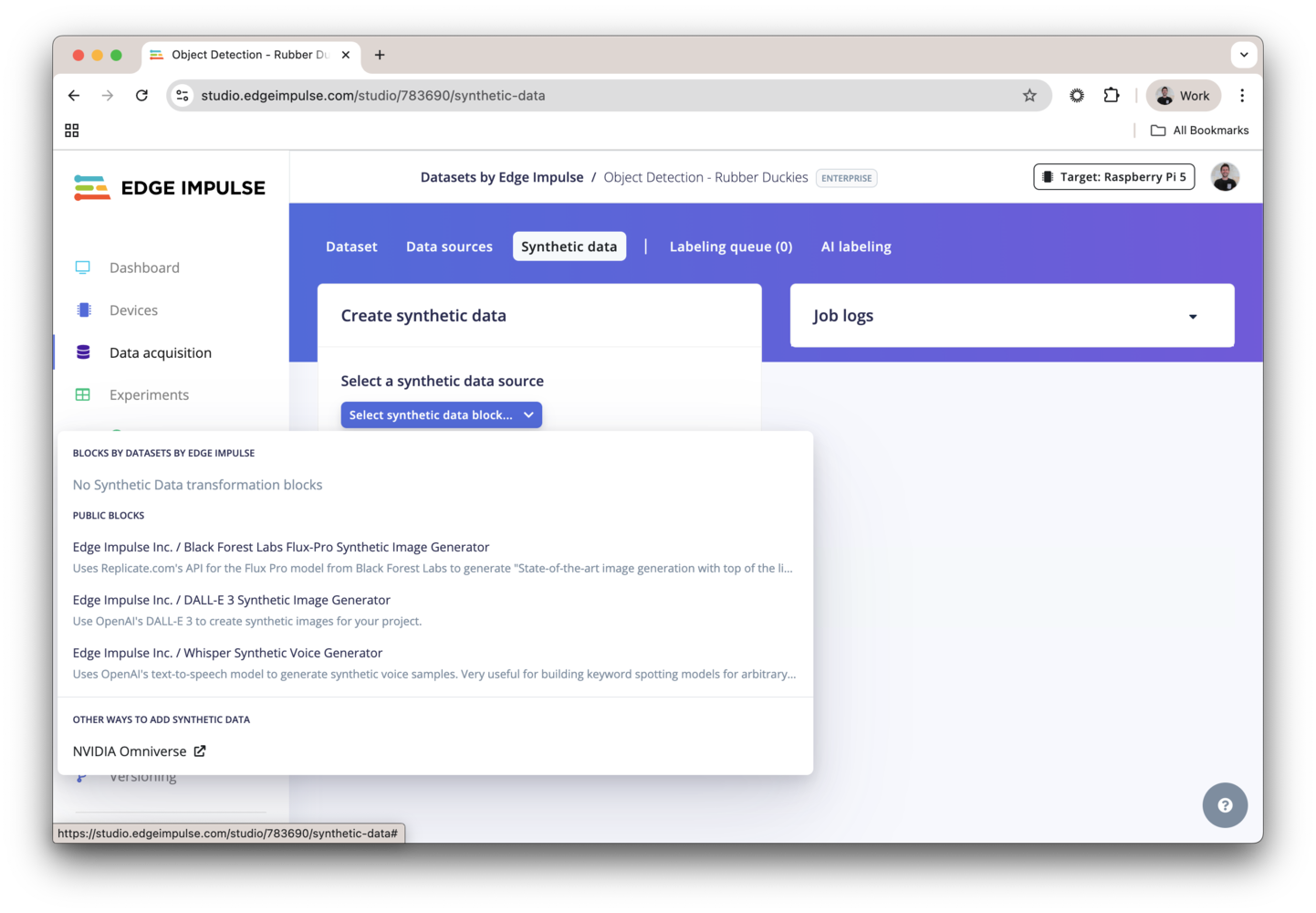
To use these blocks, navigate to the **Synthetic data** tab under the **Data acquisition** page in your project. From there, you can select the desired block and follow the prompts to generate synthetic data for your datasets.
## How generation works
Every entry in the **Synthetic data** tab is a block. To run one:
1. **Select a block** for the kind of data you need.
2. **Configure the parameters**: how much data to generate, how to label it, and whatever the model needs, such as a text prompt.
3. **Add credentials if the block calls an external provider** (OpenAI, Replicate, and similar). The API key is stored once as a secret and reused on later runs. Developer accounts manage these under **Account settings** -> [**Secrets**](/studio/account-settings); enterprise users manage them in [organization secrets](/studio/organizations/secrets).
4. **Run the generation.** Blocks that call an external provider run against your own account there, so the data you request has a cost attached.
5. **Review the result.** Generated samples land in your dataset with the label you specified, and from then on are ordinary samples you can filter, edit, relabel, or remove.
Generate a handful of samples first and inspect them before generating hundreds. A prompt that reads well can still produce images that look too similar to each other, or audio that is cleaner than what your device records.
### Using synthetic data well
Synthetic data is most useful for classes that are hard to collect in real life: rare faults, unsafe conditions, or scenarios you cannot stage.
* Keep your **test set real**. A model tested only on generated data shows how well it learned the generator's output, which might not match real conditions.
* **Tag what you generated**, using [metadata](/studio/projects/data-acquisition/dataset/metadata) such as `source: synthetic`, so you can filter it in or out later when comparing [experiments](/studio/projects/experiments).
* **Watch the balance.** Generating thousands of samples for one class can turn a small real dataset into a mostly-synthetic one.
See the [synthetic data concept page](/knowledge/concepts/data-engineering/synthetic-data) for when synthetic data is appropriate.
## Built-in blocks
The blocks list below are available directly within Studio. You can also create your own [custom synthetic data blocks](#custom-synthetic-data-blocks) if you have specific needs.
* [DALL-E Image Generation Block](#dall-e-image-generation-block)
* [FLUX Pro Image Generation Block](#flux-pro-image-generation-block)
* [Time-series Data Augmentation Block](#time-series-data-augmentation-block)
* [Whisper Keyword Spotting Generation Block](#whisper-keyword-spotting-generation-block)
To use these blocks, navigate to the **Synthetic data** tab under the **Data acquisition** page in your project. From there, you can select the desired block and follow the prompts to generate synthetic data for your datasets.
 ### DALL-E image generation block
DALL-E is a generative model that creates images from text descriptions. With the DALL-E block in the **Synthetic data** tab, you can generate image datasets for your projects. For more information, see the [DALL-E tutorial](/tutorials/topics/data/generate-image-data-dall-e).
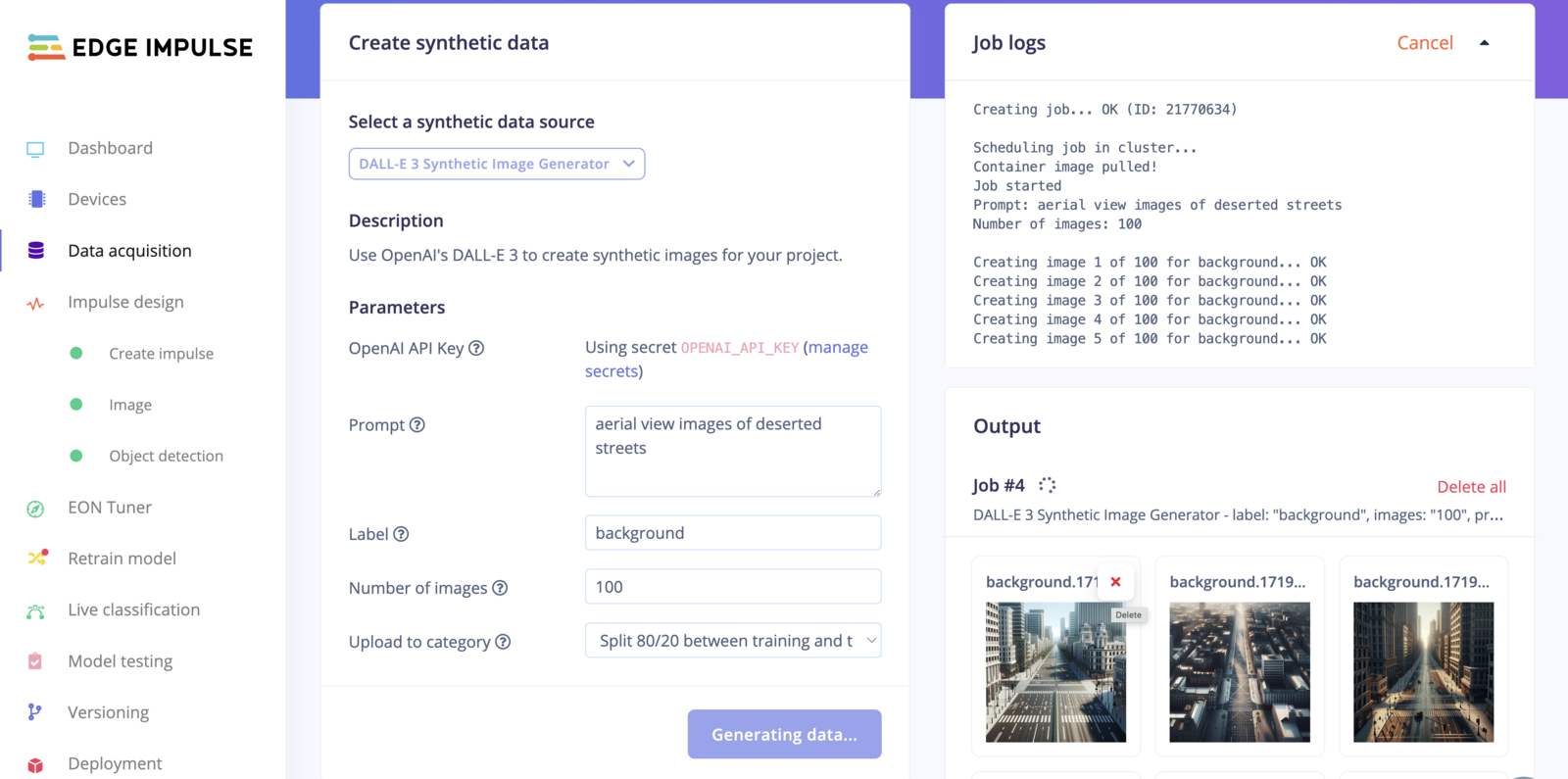
Select the DALL-E image generation block from the dropdown menu. Enter your OpenAI API key and a prompt, such as "A photo of a factory worker wearing a hard hat", or "aerial view images of deserted streets". Then, complete the rest of the fields as appropriate. Click **Generate data** to create the images.
### Flux Pro image generation block
Flux Pro is a generative model that can create high-quality images based on textual descriptions. With the Flux Pro block in the **Synthetic data** tab, you can generate image datasets for your projects. The model runs on [Replicate](https://replicate.com/), so you need a Replicate account and API key.
### DALL-E image generation block
DALL-E is a generative model that creates images from text descriptions. With the DALL-E block in the **Synthetic data** tab, you can generate image datasets for your projects. For more information, see the [DALL-E tutorial](/tutorials/topics/data/generate-image-data-dall-e).
Select the DALL-E image generation block from the dropdown menu. Enter your OpenAI API key and a prompt, such as "A photo of a factory worker wearing a hard hat", or "aerial view images of deserted streets". Then, complete the rest of the fields as appropriate. Click **Generate data** to create the images.
### Flux Pro image generation block
Flux Pro is a generative model that can create high-quality images based on textual descriptions. With the Flux Pro block in the **Synthetic data** tab, you can generate image datasets for your projects. The model runs on [Replicate](https://replicate.com/), so you need a Replicate account and API key.
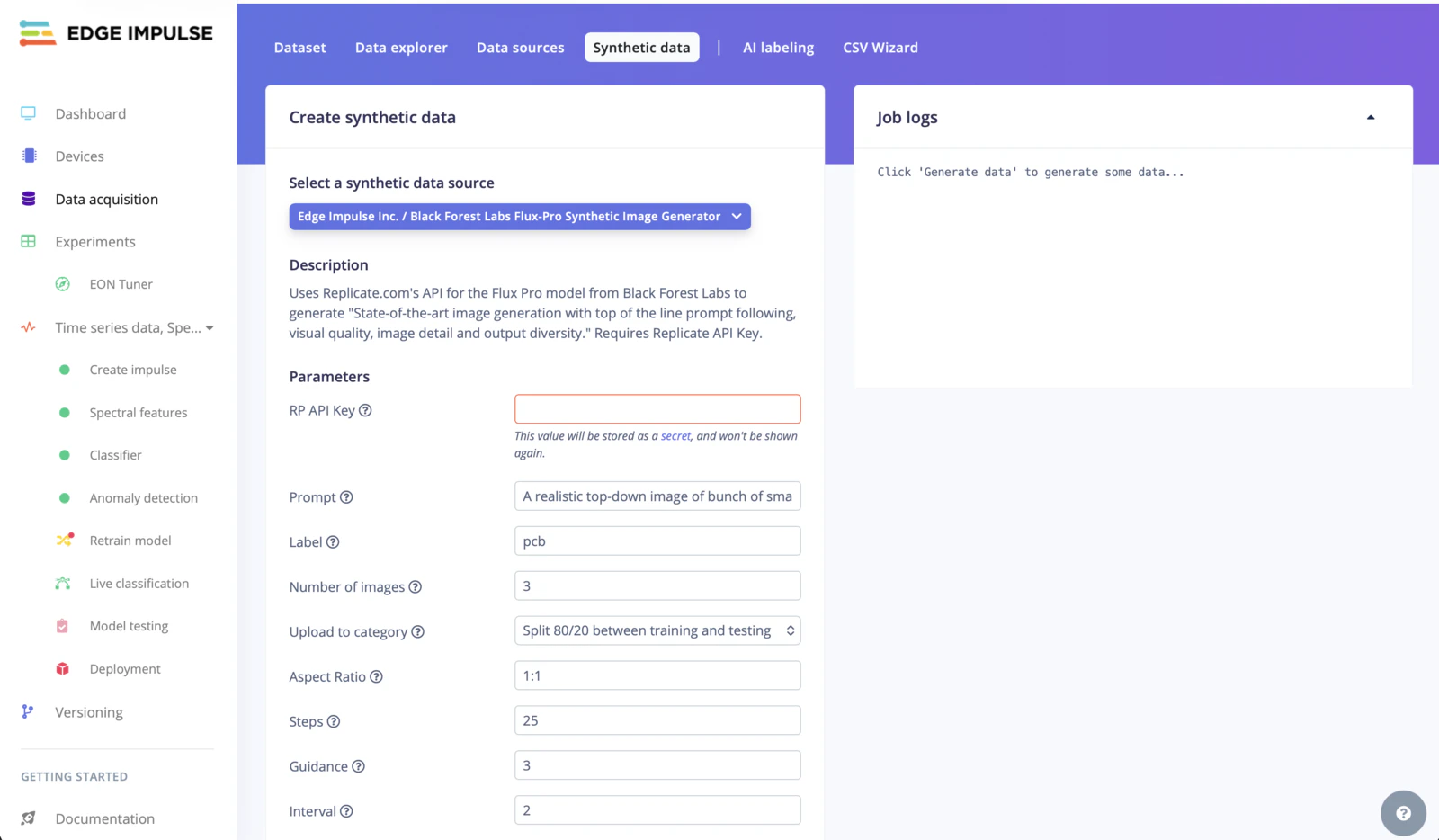 Select the Flux Pro image generation block from the dropdown menu. Enter your Replicate API key and a prompt, such as "A realistic top-down image of bunch of small and fully assembled printed circuit boards on a flat conveyor belt with long depth of field". Then, complete the rest of the fields as appropriate. Click **Generate data** to create the images.
### Time-series data augmentation block
**Only available on the Enterprise plan**
This feature is only available on the Enterprise plan. Review our [plans and pricing](https://edgeimpulse.com/pricing) or sign up for our free [expert-led trial](https://edgeimpulse.com/expert-led-trial) today.
Time-series data augmentation is a technique developed by Edge Impulse to create new time-series data from your existing datasets. With the time-series data augmentation block, you can easily generate additional time-series data to enhance your datasets and improve model performance.
Select the Flux Pro image generation block from the dropdown menu. Enter your Replicate API key and a prompt, such as "A realistic top-down image of bunch of small and fully assembled printed circuit boards on a flat conveyor belt with long depth of field". Then, complete the rest of the fields as appropriate. Click **Generate data** to create the images.
### Time-series data augmentation block
**Only available on the Enterprise plan**
This feature is only available on the Enterprise plan. Review our [plans and pricing](https://edgeimpulse.com/pricing) or sign up for our free [expert-led trial](https://edgeimpulse.com/expert-led-trial) today.
Time-series data augmentation is a technique developed by Edge Impulse to create new time-series data from your existing datasets. With the time-series data augmentation block, you can easily generate additional time-series data to enhance your datasets and improve model performance.
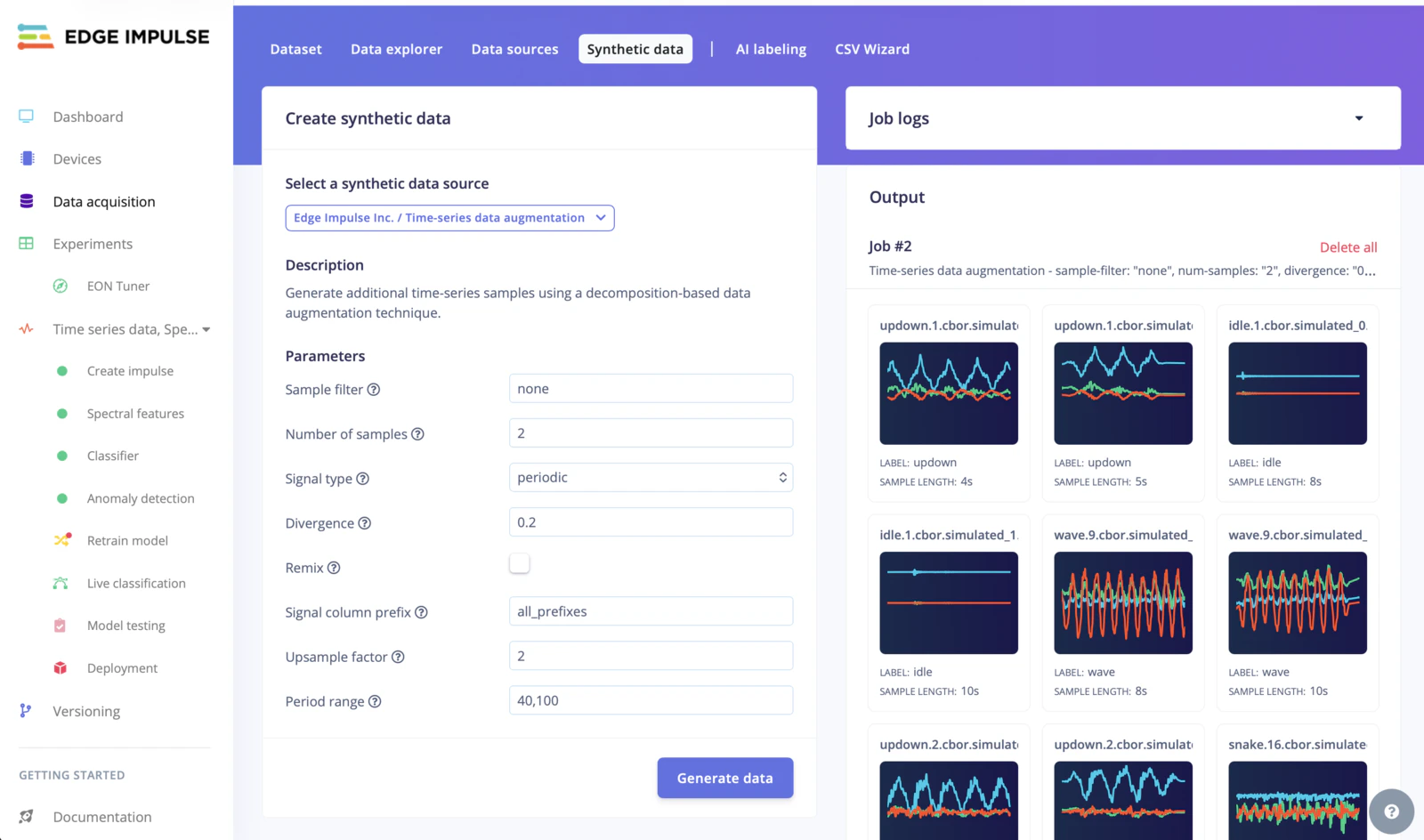 Select the time-series data augmentation block from the dropdown menu. Then configure each parameter as needed. Click **Generate data** to create the time-series samples.
For a detailed explanation of each parameter, please refer to the [Time-series data augmentation transformation block](/studio/organizations/transformation-blocks/blocks/time-series-data-augmentation) documentation.
### Whisper keyword spotting generation block
The Whisper keyword spotting block uses the OpenAI text-to-speech API to generate spoken samples of a keyword. Use it to build audio datasets for voice recognition and command-and-control applications.
Select the time-series data augmentation block from the dropdown menu. Then configure each parameter as needed. Click **Generate data** to create the time-series samples.
For a detailed explanation of each parameter, please refer to the [Time-series data augmentation transformation block](/studio/organizations/transformation-blocks/blocks/time-series-data-augmentation) documentation.
### Whisper keyword spotting generation block
The Whisper keyword spotting block uses the OpenAI text-to-speech API to generate spoken samples of a keyword. Use it to build audio datasets for voice recognition and command-and-control applications.
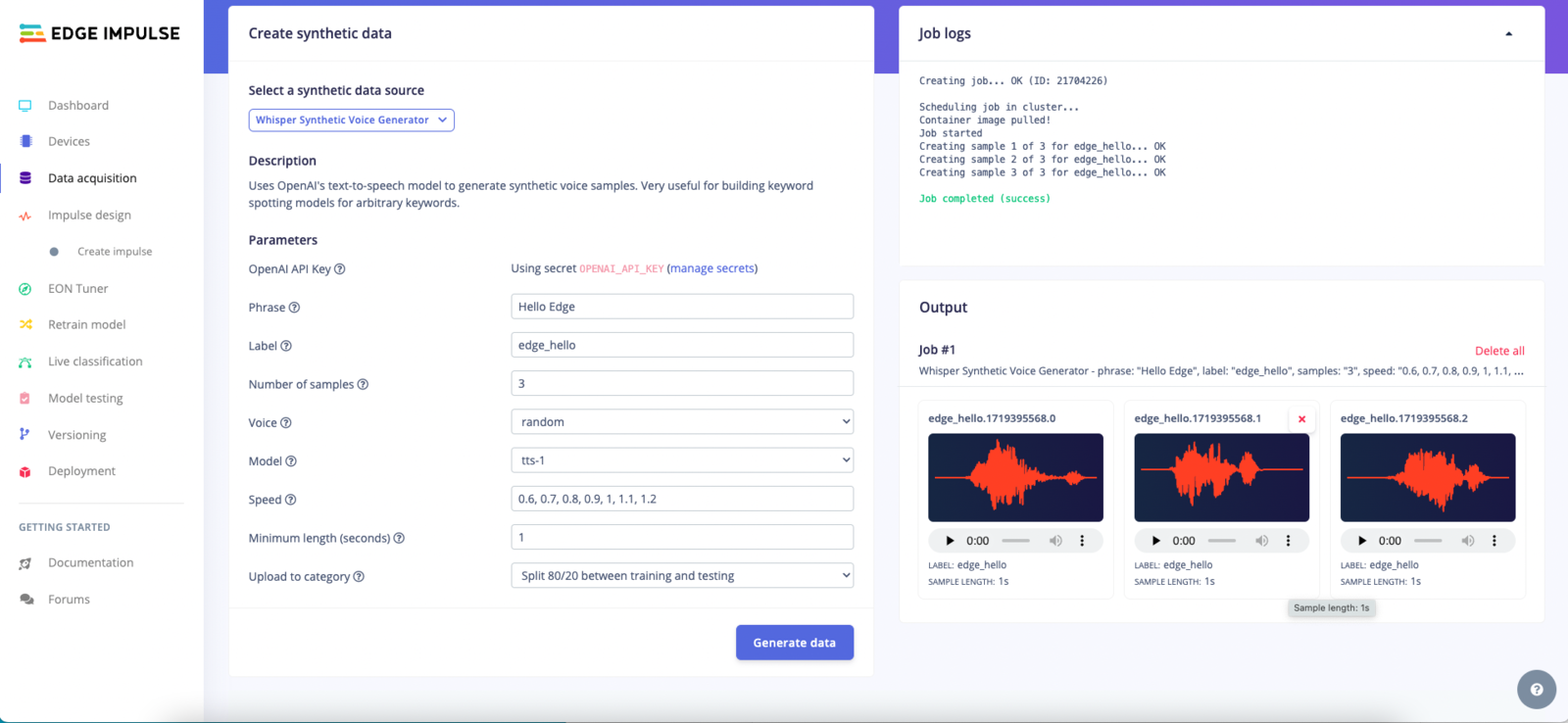 Select the Whisper keyword spotting generation block from the dropdown menu. Enter your OpenAI API key and a keyword, such as "Hello Edge!". Then, complete the rest of the fields as appropriate. Click **Generate data** to create the voice samples.
## Custom synthetic data blocks
If none of the blocks from Edge Impulse fit your needs, you can modify them or develop from scratch to create a custom synthetic data block. This allows you to to integrate your custom generative models for unique project requirements. See the [Custom synthetic data blocks](/studio/organizations/custom-blocks/custom-synthetic-data-blocks) page for more information.
## Additional resources
* [DALL-E tutorial](/tutorials/topics/data/generate-image-data-dall-e)
* [Time-series data augmentation transformation block](/studio/organizations/transformation-blocks/blocks/time-series-data-augmentation)
* [Custom synthetic data blocks](/studio/organizations/custom-blocks/custom-synthetic-data-blocks)
Select the Whisper keyword spotting generation block from the dropdown menu. Enter your OpenAI API key and a keyword, such as "Hello Edge!". Then, complete the rest of the fields as appropriate. Click **Generate data** to create the voice samples.
## Custom synthetic data blocks
If none of the blocks from Edge Impulse fit your needs, you can modify them or develop from scratch to create a custom synthetic data block. This allows you to to integrate your custom generative models for unique project requirements. See the [Custom synthetic data blocks](/studio/organizations/custom-blocks/custom-synthetic-data-blocks) page for more information.
## Additional resources
* [DALL-E tutorial](/tutorials/topics/data/generate-image-data-dall-e)
* [Time-series data augmentation transformation block](/studio/organizations/transformation-blocks/blocks/time-series-data-augmentation)
* [Custom synthetic data blocks](/studio/organizations/custom-blocks/custom-synthetic-data-blocks)